

19 April 2011
Animation Mentor Class 5 week 3- final
Animation updates:
Full facial animation
Minor animation adjustments.


04 April 2011
AM class 4 Week 1
Ahhh, it's Class 5 now. Time went past so quickly. My life at moment is very tough. Mostly I feel physically and mentally tired. I really wanna just focus on animation, but life goes on with unexpected dramas.
What I can do for now is just keep on going...Bless me...
What I can do for now is just keep on going...Bless me...
22 March 2011
13 March 2011
06 March 2011
Some thoughts on adding extra frames before and after your shots
Hi guys, after the Q&A last week, I thought about putting this idea here to share with you guys.
It is as to adding extra frames(let's say 10 frames) before and after your shots. It also means you will have to animate that extra 20 frames for the sake of your main shots. This way, it will ensure your shot doesn't have a dead start or dead end, since there are shots before and after yours.
Another important factor is that in this way it will make sure you won't have weird motion blur in the final production, think about your shot end at frame 100, and your character is jumping, so what's going to happen to the motion blur at 100 if there is no more frames after it?(if you know how motion blur is created)
Cheers.
It is as to adding extra frames(let's say 10 frames) before and after your shots. It also means you will have to animate that extra 20 frames for the sake of your main shots. This way, it will ensure your shot doesn't have a dead start or dead end, since there are shots before and after yours.
Another important factor is that in this way it will make sure you won't have weird motion blur in the final production, think about your shot end at frame 100, and your character is jumping, so what's going to happen to the motion blur at 100 if there is no more frames after it?(if you know how motion blur is created)
Cheers.
24 February 2011
add or remove keyframes MEL in Maya
UPDATED 10/2012: see below for the updates.
Hi guys, I have been using this method for a while now, and I have found it quite useful. So I thought it could be a salient idea to share with you guys as well as for future reference so that I can find it. :D
So let's get started. Firstly, Let me introduce the following MEL code:
timeSliderEditKeys addInbetween;
timeSliderEditKeys removeInbetween;
So, its very straight forward, the first line is adding a frame, the second one is removing a frame.
Next, let's make a button on a shelf.
1. create a new shelf or use the existing one.
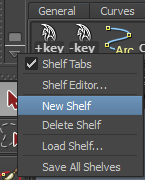
2. open up script editor, copy and past the code above to the editor
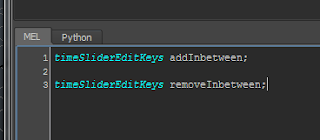
3. select one line,and hold MMB(middle mouse button) and drag the code to the shelf, save as MEL script.
4. select the other line, and do the same as above.
5. change names, I usually name it as '+key' and '-key'.

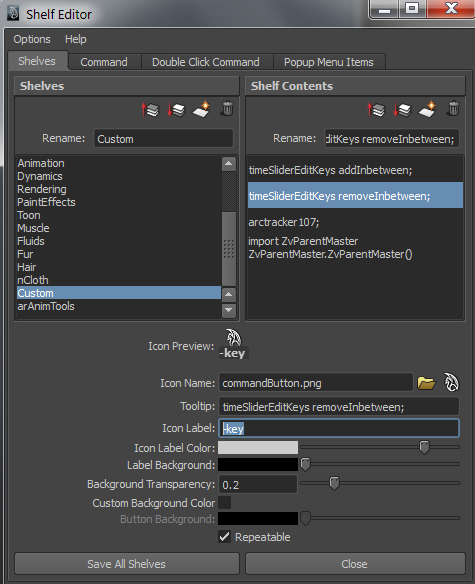
6. done!
Tips:
when you animate a shot, if you want to adjust the timing of one particular part, then remember to select all the controls and then add or remove frames. This way, you won't mess up with your keyframes and other timing.
Hope this helps.
----------------------------------------------------------------------------------------------------------------------
Updates (10/2012):
Let's make a shortcut for this one. (faster workflow)
Step 1: click->Window->Settings/Pref ->Hotkey editor

Step 2: Create a new Hotkey by click 'New', input values as shown below for the add inbetweens, same process for remove inbetweens.
Step 3: Assign new hotkey, This is your part to fill in, depend on what hotkeys you feel right. for me I'd like to use 'Option' + d(for Mac), or 'Alt' + d (for PC) for adding inbetweens, and 'option' + s, or 'Alt' + s for remove inbetweens. Sometimes Maya tells you the Hotkey is already assigned to something else, if you find that you will never use that you can replace it.

This process will fastern your animation workflow. Similarly if you want to assign a Hotkey to open Outliner, you can do so by adding OutlinerWindow; to the Command area then create a new Hotkey (I use Alt + b)
Hi guys, I have been using this method for a while now, and I have found it quite useful. So I thought it could be a salient idea to share with you guys as well as for future reference so that I can find it. :D
So let's get started. Firstly, Let me introduce the following MEL code:
timeSliderEditKeys addInbetween;
timeSliderEditKeys removeInbetween;
So, its very straight forward, the first line is adding a frame, the second one is removing a frame.
Next, let's make a button on a shelf.
1. create a new shelf or use the existing one.
2. open up script editor, copy and past the code above to the editor

3. select one line,and hold MMB(middle mouse button) and drag the code to the shelf, save as MEL script.
4. select the other line, and do the same as above.
5. change names, I usually name it as '+key' and '-key'.

6. done!
Tips:
when you animate a shot, if you want to adjust the timing of one particular part, then remember to select all the controls and then add or remove frames. This way, you won't mess up with your keyframes and other timing.
Hope this helps.
----------------------------------------------------------------------------------------------------------------------
Updates (10/2012):
Let's make a shortcut for this one. (faster workflow)
Step 1: click->Window->Settings/Pref ->Hotkey editor

Step 2: Create a new Hotkey by click 'New', input values as shown below for the add inbetweens, same process for remove inbetweens.
Step 3: Assign new hotkey, This is your part to fill in, depend on what hotkeys you feel right. for me I'd like to use 'Option' + d(for Mac), or 'Alt' + d (for PC) for adding inbetweens, and 'option' + s, or 'Alt' + s for remove inbetweens. Sometimes Maya tells you the Hotkey is already assigned to something else, if you find that you will never use that you can replace it.

This process will fastern your animation workflow. Similarly if you want to assign a Hotkey to open Outliner, you can do so by adding OutlinerWindow; to the Command area then create a new Hotkey (I use Alt + b)
08 February 2011
AM class 4 week 5
Hi guys, sorry for the unactive update, this is the final week on this shot, so I thought I'd upload it to share it with you guys, enjoy.
23 January 2011
AM has now started!!
I am currently in class 4 with Nicole Herr. Our assignment is to create an animation that includes two opposite emtions, which I have been studying during my Honors, so this could be good. I created a brand new animation, and I like it so far.
At moment I am in blocking stage, and I will upload it when I finalise it. So ......yeah, be patient :)
At moment I am in blocking stage, and I will upload it when I finalise it. So ......yeah, be patient :)
25 November 2010
Showreel 2010
yeah, its another year for showreel, didn't put background music in it, but you will still find some surprises in it. :)
20 November 2010
very first time facial animation test
This is the refined version, not the final version.
This is my first time doing lip sync, have no idea how to do it properly, I just did as I felt like it ;)
rig is from book CD 'stop staring'.
sound file is from 11 sec club, Nov. contest file.
time taken: 6 hours.
This is my first time doing lip sync, have no idea how to do it properly, I just did as I felt like it ;)
rig is from book CD 'stop staring'.
sound file is from 11 sec club, Nov. contest file.
time taken: 6 hours.
Subscribe to:
Posts (Atom)